By ATS Staff - April 28th, 2026
Backup Tools Cloud Storage Linux Operating Systems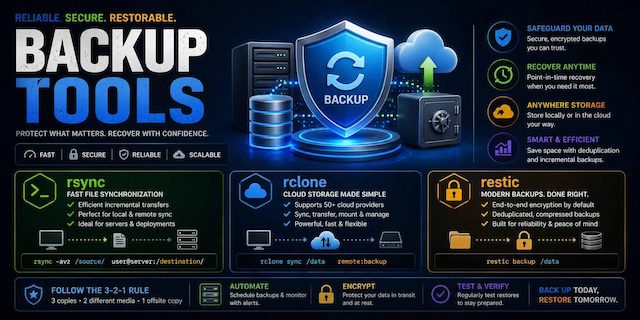
A practical guide for reliable, secure, and scalable data protection
Why “production-ready” matters
A backup isn’t production-ready just because it exists. It must be:
- Reliable → works every time, even under failure
- Recoverable → you can restore quickly and correctly
- Secure → protected from breaches and ransomware
- Scalable → grows with your data
- Tested → proven through regular restore drills
A surprising number of systems fail not during backup—but during restore.
Core Principles
1. The 3-2-1 Rule
Maintain:
- 3 copies of data
- 2 different media types
- 1 offsite copy
Modern extension:
- Add immutability (cannot be altered/deleted)
- Add air-gapped backup (isolated from main system)
2. Backup ≠ Sync
- Sync tools mirror mistakes (including deletions)
- Backups preserve history
A production system must always include:
- Versioning (snapshots)
- Point-in-time recovery
3. Defense in Depth
Use multiple layers:
- Local backups
- Offsite/cloud backups
- Immutable storage
- Monitoring & alerts
Reference Architecture (Modern Setup)
Layer 1: Primary Data (Live System)
- Application servers
- Databases
- File storage
Examples:
- Web servers
- Business apps
- File shares
Layer 2: Local Backup (Fast Recovery)
Goal: Quick restores (minutes)
Tools:
rsync(fast sync)- Snapshot systems (ZFS, LVM, Btrfs)
Pattern:
rsync -av --delete /data /local-backup/
Enhancements:
- Hourly snapshots
- Retention (e.g., 24 hourly, 7 daily)
Layer 3: Backup Repository (Versioned)
Goal: Secure, deduplicated backups
Tools:
restic(recommended)- BorgBackup (alternative)
Pattern:
restic backup /local-backup
Features:
- Encryption (default)
- Deduplication
- Incremental snapshots
Layer 4: Offsite / Cloud Backup
Goal: Disaster recovery
Tools:
rclone- Cloud providers (S3, Backblaze, etc.)
Pattern:
rclone sync /backup-repo remote:backup
Best practices:
- Enable object versioning
- Use lifecycle policies
- Encrypt data before upload
Layer 5: Immutable Storage (Ransomware Protection)
Critical for modern threats.
Options:
- S3 Object Lock
- Write-once storage
- Offline drives (air-gapped)
Data Flow Overview
[Production Data]
        ↓
[Local Sync (rsync)]
        ↓
[Snapshot Backup (restic)]
        ↓
[Cloud Sync (rclone)]
        ↓
[Immutable Storage]
Backup Scheduling Strategy
Frequency
| Data Type | Frequency |
|---|---|
| Critical DB | Every 15–60 mins |
| App data | Hourly |
| Full system | Daily |
| Offsite sync | Daily or real-time |
Example Cron Jobs
1. Local sync (every hour)
0 * * * * rsync -a /data /backup/local
2. restic backup (every 6 hours)
0 */6 * * * restic backup /backup/local
3. Cloud sync (daily)
0 2 * * * rclone sync /restic-repo remote:repo
Retention Policy
A good retention policy balances:
- Storage cost
- Recovery flexibility
Example (Grandfather-Father-Son model)
- Hourly → last 24 hours
- Daily → last 7 days
- Weekly → last 4 weeks
- Monthly → last 12 months
Security Design
Encryption
- Use end-to-end encryption (restic does this by default)
- Never rely solely on provider encryption
Access Control
- Separate backup credentials from production
- Use read-only access where possible
Ransomware Protection
- Immutable backups
- Offline copies
- No direct write access from production servers
Monitoring & Alerting
A production system must include:
- Backup success/failure alerts
- Storage usage monitoring
- Integrity checks
Tools:
- Email alerts
- Slack/webhooks
- Monitoring systems (Prometheus, etc.)
Disaster Recovery Plan (DR)
Backups are useless without a recovery plan.
Define:
- RPO (Recovery Point Objective)
→ How much data you can lose - RTO (Recovery Time Objective)
→ How fast you must recover
Example Targets:
- RPO: 1 hour
- RTO: 2 hours
Restore Testing (Critical)
Test regularly:
- File-level restore
- Full system restore
- Database recovery
Recommended:
- Monthly restore drills
- Simulated failure scenarios
Common Mistakes to Avoid
1. No restore testing
Most common failure point.
2. Only one backup location
Single point of failure.
3. No encryption
Risk of data breach.
4. Using sync instead of backup
Leads to permanent data loss.
5. Ignoring logs
Silent failures are dangerous.
Example Real-World Setup (Small Business)
For something like a renovation business (e.g., project files, invoices, media):
- NAS (local storage)
- Hourly rsync to backup drive
- restic snapshots every 6 hours
- rclone to cloud daily
- Monthly offline backup (external drive)
Scaling the Architecture
As you grow:
- Add multiple backup nodes
- Use distributed storage
- Automate failover
- Integrate with CI/CD pipelines
Final Thoughts
A production-ready backup architecture is not about tools—it’s about strategy.
The winning formula:
- rsync → speed
- restic → safety
- rclone → offsite resilience
Together they provide:
- Fast recovery
- Strong security
- Long-term reliability
Popular Categories
Agile 2 Android 2 Artificial Intelligence 52 Backup Tools 2 Blockchain 2 Cloud Storage 5 Code Editors 2 Computer Languages 12 Cybersecurity 9 Data Science 18 Database 9 Digital Marketing 3 Ecommerce 4 Email Server 2 Finance 3 Google 6 HTML-CSS 2 Industries 6 Infrastructure 4 iOS 3 IoT 1 Javascript 6 Latest Technologies 45 Linux 10 LLMs 11 Machine Learning 32 Mobile 3 Msths & Stats 1 MySQL 3 Open source 1 Operating Systems 7 PHP 2 Project Management 3 Python Programming 28 SEO - AEO 5 Software Development 49 Software Testing 3 Web Server 7 Work Ethics 2