By ATS Staff - April 28th, 2026
Cybersecurity Linux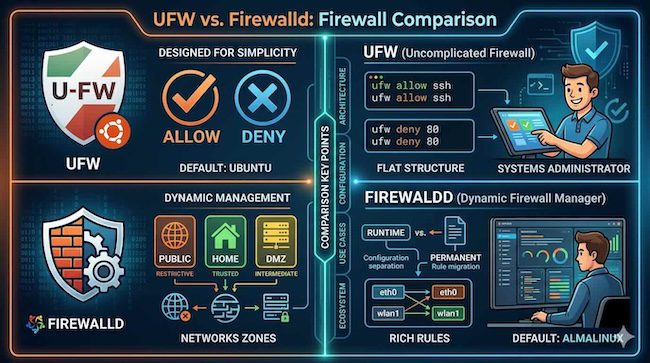
When securing a Linux server, choosing between UFW (Uncomplicated Firewall) and firewalld often comes down to the distribution you are using, as each is deeply integrated into its respective ecosystem. While both act as user-friendly interfaces for managing the underlying kernel-level packet filtering (netfilter), they follow distinct architectural philosophies.
At a Glance: Key Differences
| Feature | UFW (Ubuntu/Debian) | Firewalld (AlmaLinux/RHEL) |
|---|---|---|
| Philosophy | Simplicity and ease of use. | Dynamic management and zoning. |
| Primary Concept | Direct rule management. | Network zones and services. |
| Configuration | Flat, simple command syntax. | State-based, persistent vs. runtime. |
| Flexibility | Best for standard, static setups. | Best for complex, dynamic environments. |
UFW: The "Uncomplicated" Approach
UFW was created specifically to make firewall configuration approachable for users who find raw iptables commands intimidating. It is the default on Ubuntu.
- Design Philosophy: UFW focuses on "what you see is what you get." When you add a rule, it is applied directly. Its simplicity makes it exceptionally fast to set up for standard web or application servers.
- Workflow: You generally set a default policy (e.g., deny all incoming, allow all outgoing) and then add specific exceptions.
- Best For: Users who need a quick, reliable, and straightforward firewall configuration without managing complex network segments.
Firewalld: The Dynamic Approach
firewalld is the default in the RHEL-based ecosystem, which includes AlmaLinux. It introduces the concept of "zones" to handle network trust levels dynamically.
- Design Philosophy: It assumes your server might connect to various types of networks (e.g., a public Wi-Fi, a secure corporate network, or a local home network). Instead of just "opening a port," you place an interface into a specific zone that has a pre-defined set of rules.
- Dynamic Management: A major advantage of
firewalldis its ability to apply changes to the firewall configuration without restarting the service or dropping existing connections. It maintains a separation between runtime (immediate) and permanent (boot-persistent) configurations. - Best For: Administrators managing servers with multiple network interfaces, virtualized environments, or scenarios where firewall rules need to change based on the network environment the server is currently in.
Making Your Choice
You rarely choose between them based on personal preference alone; usually, your choice is dictated by your distribution's defaults:
- Stick with the Native Tool: If you are on Ubuntu, use UFW. If you are on AlmaLinux, use
firewalld. These tools are integrated with other system services (like NetworkManager or system boot processes) in ways that make the native tool significantly easier to maintain. - When to Bridge the Gap: If you have deep expertise in one and a specific need for its features (like
firewalld's rich, complex rules), it is possible to install the other tool, but it is highly discouraged. Mixing firewall management tools often leads to conflicts, overwritten rules, and unpredictable security holes.
In summary, UFW is your companion for speed and simplicity, while firewalld is an enterprise-grade engine built for flexibility and sophisticated network control.
Popular Categories
Agile 2 Android 2 Artificial Intelligence 52 Backup Tools 2 Blockchain 2 Cloud Storage 5 Code Editors 2 Computer Languages 12 Cybersecurity 9 Data Science 18 Database 9 Digital Marketing 3 Ecommerce 4 Email Server 2 Finance 3 Google 6 HTML-CSS 2 Industries 6 Infrastructure 4 iOS 3 IoT 1 Javascript 6 Latest Technologies 45 Linux 10 LLMs 11 Machine Learning 32 Mobile 3 Msths & Stats 1 MySQL 3 Open source 1 Operating Systems 7 PHP 2 Project Management 3 Python Programming 28 SEO - AEO 5 Software Development 49 Software Testing 3 Web Server 7 Work Ethics 2