By ATS Staff - April 27th, 2026
Backup Tools Linux Operating Systems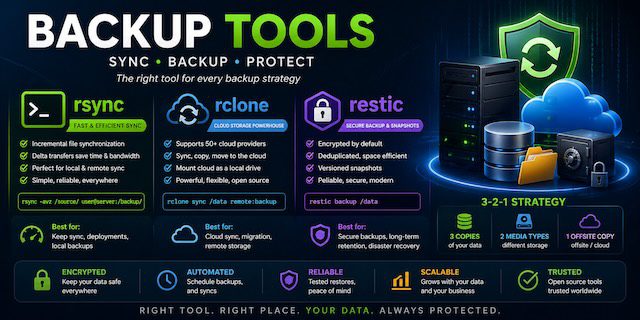
When it comes to file transfer, synchronization, and backups in Linux and cloud environments, three tools consistently stand out:
- rsync → fast file synchronization
- rclone → cloud storage powerhouse
- restic → secure, modern backup system
They overlap in some areas—but they are built for very different purposes. Choosing the wrong one can lead to inefficient workflows or fragile backups.
Core Philosophy
| Tool | Primary Purpose |
|---|---|
| rsync | Efficient file syncing between systems |
| rclone | Syncing and managing cloud storage |
| restic | Secure, versioned backups with encryption |
1. rsync — The Classic Workhorse
What it does best
- Local and remote file synchronization
- Incremental transfers (only changed data)
- Fast and reliable over SSH
Strengths
- Extremely efficient (delta transfer algorithm)
- Installed by default on most Linux systems
- Ideal for servers and deployments
- Simple and predictable
Limitations
- No built-in encryption (relies on SSH)
- No versioned backups (without custom scripts)
- Not cloud-native
Best use cases
- Server-to-server sync
- Website deployment
- Local backups
- Mirroring directories
2. rclone — The Cloud Commander
What it does best
- Syncing files with cloud providers
- Managing remote storage like a filesystem
Supports:
- Google Drive
- AWS S3
- Dropbox
- OneDrive
- 50+ providers
Strengths
- Native cloud integration
- Encryption support
- Mount cloud storage as a local drive
- Parallel transfers for speed
Limitations
- Not designed for true backups (no snapshots by default)
- Can overwrite/delete data if misused
- Slightly steeper learning curve
Example
rclone sync ./data remote:backup
Best use cases
- Cloud backups (basic sync)
- Migrating data between providers
- Hybrid local-cloud workflows
3. restic — The Backup Specialist
What it does best
- Secure, versioned backups
- Snapshot-based backup system
- Built-in encryption
Strengths
- End-to-end encryption by default
- Deduplication (saves storage space)
- Incremental snapshots
- Works with local and cloud storage
Limitations
- Not for direct file syncing
- Slightly slower than rsync for raw transfers
- Requires repository initialization
Example
restic backup /home/user
Best use cases
- Long-term backups
- Disaster recovery
- Secure offsite backups
- Versioned data storage
Feature Comparison
| Feature | rsync | rclone | restic |
|---|---|---|---|
| File Sync | ✅ Excellent | ✅ Excellent | ❌ Not designed for it |
| Cloud Support | ❌ Limited | ✅ Extensive | ✅ Yes |
| Encryption | ⚠️ via SSH | ✅ Built-in | ✅ Default |
| Versioning | ❌ No | ⚠️ Limited | ✅ Strong |
| Deduplication | ❌ | ❌ | ✅ Yes |
| Snapshots | ❌ | ❌ | ✅ Yes |
| Speed | 🚀 Very fast | 🚀 Fast | ⚖️ Moderate |
| Ease of Use | ✅ Simple | ⚖️ Medium | ⚖️ Medium |
Key Differences Explained
1. Sync vs Backup
- rsync / rclone = synchronization tools
→ Destination mirrors source - restic = backup tool
→ Keeps history (snapshots)
👉 Important distinction:
- Sync tools can delete your data
- Backup tools are designed to protect it
2. Local vs Cloud Focus
- rsync → local + SSH
- rclone → cloud-first
- restic → hybrid (local + cloud backups)
3. Data Safety
- rsync:
- No protection against accidental deletion
- rclone:
- Same risk unless configured carefully
- restic:
- Built for safety (snapshots + encryption)
Real-World Scenarios
Scenario 1: Website Deployment
Use:
- rsync
Why:
- Fast incremental updates
- Minimal bandwidth usage
Scenario 2: Sync Files to Google Drive
Use:
- rclone
Why:
- Native cloud support
- Easy automation
Scenario 3: Full System Backup
Use:
- restic
Why:
- Encryption + versioning
- Restore any point in time
Scenario 4: Hybrid Strategy (Best Practice)
Many professionals combine all three:
- rsync → local fast sync
- rclone → cloud transfer
- restic → secure backup layer
Example Combined Workflow
- Sync files locally:
rsync -av /data /backup
- Backup with restic:
restic backup /backup
- Push to cloud:
rclone sync /backup remote:storage
Performance Considerations
- rsync: fastest for local/network sync
- rclone: optimized for cloud throughput
- restic: optimized for safety, not raw speed
Security Comparison
| Tool | Security Model |
|---|---|
| rsync | Depends on SSH |
| rclone | Optional encryption |
| restic | Mandatory encryption |
When NOT to Use Each Tool
Avoid rsync if:
- You need versioned backups
- You’re working heavily with cloud storage
Avoid rclone if:
- You need reliable backup history
- Data integrity is critical
Avoid restic if:
- You just need quick file sync
- You want immediate file-level access
Final Verdict
- Choose rsync for:
→ Speed and efficiency in file synchronization - Choose rclone for:
→ Cloud storage management and transfers - Choose restic for:
→ Secure, reliable backups
Bottom Line
These tools are not competitors—they are complementary.
- rsync moves data efficiently
- rclone connects you to the cloud
- restic protects your data long-term
Used together, they form a powerful, production-grade data strategy.
Popular Categories
Agile 2 Android 2 Artificial Intelligence 52 Backup Tools 2 Blockchain 2 Cloud Storage 5 Code Editors 2 Computer Languages 12 Cybersecurity 9 Data Science 18 Database 9 Digital Marketing 3 Ecommerce 4 Email Server 2 Finance 3 Google 6 HTML-CSS 2 Industries 6 Infrastructure 4 iOS 3 IoT 1 Javascript 6 Latest Technologies 45 Linux 10 LLMs 11 Machine Learning 32 Mobile 3 Msths & Stats 1 MySQL 3 Open source 1 Operating Systems 7 PHP 2 Project Management 3 Python Programming 28 SEO - AEO 5 Software Development 49 Software Testing 3 Web Server 7 Work Ethics 2