By ATS Staff - April 27th, 2026
Cloud Storage Infrastructure Linux Operating Systems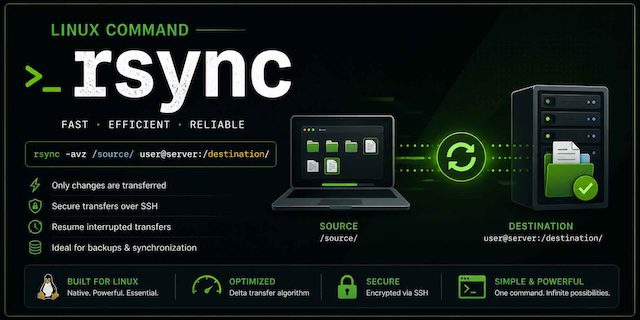
rsync (remote sync) is one of the most powerful and efficient tools for transferring and synchronizing files across systems. It’s widely used by developers, system administrators, and even everyday users who need reliable backups or file replication.
What is rsync?
rsync is a command-line utility designed to copy and synchronize files and directories between two locations:
- On the same machine
- Between local and remote systems
- Between two remote systems (via SSH)
Its key advantage is efficiency—it only transfers the differences between files rather than copying everything again.
Why rsync is so popular
1. Delta Transfer Algorithm
rsync uses a smart algorithm that:
- Detects changes in files
- Transfers only modified portions
This makes it:
- Faster than traditional copy tools
- Ideal for large datasets
2. Compression
It can compress data during transfer:
rsync -z source/ user@remote:/destination/
Useful for:
- Slow networks
- Remote backups
3. Resume Capability
If a transfer is interrupted, rsync can resume without restarting from scratch.
4. Works over SSH
Secure file transfers using:
rsync -e ssh source/ user@host:/path/
5. Flexible and Scriptable
Perfect for:
- Automation
- Cron jobs
- Backup pipelines
Basic Syntax
rsync [options] source destination
Common Examples
1. Copy files locally
rsync -av folder1/ folder2/
-a= archive mode (preserves permissions, timestamps)-v= verbose
2. Copy to a remote server
rsync -av folder/ user@server:/backup/
3. Copy from remote to local
rsync -av user@server:/backup/ folder/
4. Delete extra files at destination
rsync -av --delete source/ destination/
Keeps destination an exact mirror.
5. Dry run (preview changes)
rsync -av --dry-run source/ destination/
Always use this before risky operations.
Important Options Explained
| Option | Meaning |
|---|---|
-a | Archive (recursive + preserve metadata) |
-v | Verbose output |
-z | Compress during transfer |
-r | Recursive |
--delete | Remove files not in source |
--progress | Show progress |
--exclude | Skip files |
Excluding Files
rsync -av --exclude="*.log" source/ destination/
Multiple exclusions:
rsync -av --exclude="node_modules" --exclude="*.tmp" source/ dest/
Incremental Backups
rsync is commonly used for backups:
rsync -av --delete /home/user/ /backup/user/
For versioned backups:
rsync -av --link-dest=/backup/previous /source /backup/new
This creates hard-linked snapshots—efficient and space-saving.
rsync over SSH (Best Practice)
rsync -avz -e ssh /local/ user@remote:/path/
Benefits:
- Encryption
- Authentication
- Firewall-friendly
Performance Tips
- Use
--partialfor large files:rsync --partial -av source/ dest/ - Limit bandwidth:
rsync --bwlimit=1000 source/ dest/ - Use
--info=progress2for better progress display
Common Pitfalls
Trailing Slash Matters
rsync -av dir/ dest/   # copies contents
rsync -av dir dest/    # copies directory itself
Accidental Deletions
Using --delete can remove important files if misused.
Always test with:
--dry-run
Use Cases
1. Website Deployment
rsync -avz ./project user@server:/var/www/html
2. Server Backups
Automated daily sync using cron.
3. Data Migration
Move large datasets efficiently between servers.
4. Syncing Development Environments
Keep local and remote environments identical.
rsync vs Other Tools
| Tool | Strength |
|---|---|
| rsync | Efficient incremental sync |
| scp | Simple file copy |
| cp | Local copy only |
| tar | Archiving, not syncing |
Security Considerations
- Always prefer SSH over plain rsync daemon
- Use key-based authentication
- Limit access permissions on destination
Advanced Features
1. Daemon Mode
rsync can run as a service:
rsync://server/module
2. Include/Exclude Rules Files
rsync -av --exclude-from='exclude.txt' source/ dest/
3. Partial Transfers
Handles large files efficiently without restarting
When to Use rsync
Use rsync when you need:
- Reliable backups
- Efficient file transfers
- Remote synchronization
- Automation and scripting
Conclusion
rsync remains one of the most essential tools in modern computing due to its:
- Speed
- Efficiency
- Flexibility
- Reliability
Whether you're running a production server, managing backups, or syncing files across systems, rsync provides a robust solution that scales from simple tasks to enterprise-level workflows.
Popular Categories
Agile 2 Android 2 Artificial Intelligence 52 Backup Tools 2 Blockchain 2 Cloud Storage 5 Code Editors 2 Computer Languages 12 Cybersecurity 9 Data Science 18 Database 9 Digital Marketing 3 Ecommerce 4 Email Server 2 Finance 3 Google 6 HTML-CSS 2 Industries 6 Infrastructure 4 iOS 3 IoT 1 Javascript 6 Latest Technologies 45 Linux 10 LLMs 11 Machine Learning 32 Mobile 3 Msths & Stats 1 MySQL 3 Open source 1 Operating Systems 7 PHP 2 Project Management 3 Python Programming 28 SEO - AEO 5 Software Development 49 Software Testing 3 Web Server 7 Work Ethics 2